🤖 Build Production AI Agents?
Our AI Agent Development Service helps you design, build, and deploy production-ready agents with memory management, tool-calling, and RAG integration. Get started →
The term "AI agent" is used loosely — sometimes to mean a chatbot that answers questions, sometimes to mean a fully autonomous system that plans multi-step tasks, calls external APIs, writes code, searches the web, and updates its own memory. These are fundamentally different things, and understanding the architecture behind a true AI agent is essential if you want to build them that actually work reliably in production.
I've been building AI-powered systems for clients since before GPT-3 — from rule-based automation to today's LLM-orchestrated multi-agent pipelines. Here's the complete architecture guide from the ground up.
1. What is an AI Agent?
An AI agent is a system that uses a large language model (LLM) as its reasoning engine to autonomously plan and execute multi-step tasks — calling tools, storing and retrieving memory, adapting based on results, and iterating toward a goal without a human directing every step.
The key distinction from a standard chatbot:
Chatbot vs AI Agent
Chatbot: Takes user input → generates one response → waits for next input. Single-turn or multi-turn conversation. No external actions. No persistent memory beyond the current context window.
AI Agent: Takes a goal → decomposes it into tasks → selects and calls tools to gather information or take actions → evaluates results → updates its plan → repeats until goal is achieved. Persistent memory. External API access. Autonomous multi-step execution.
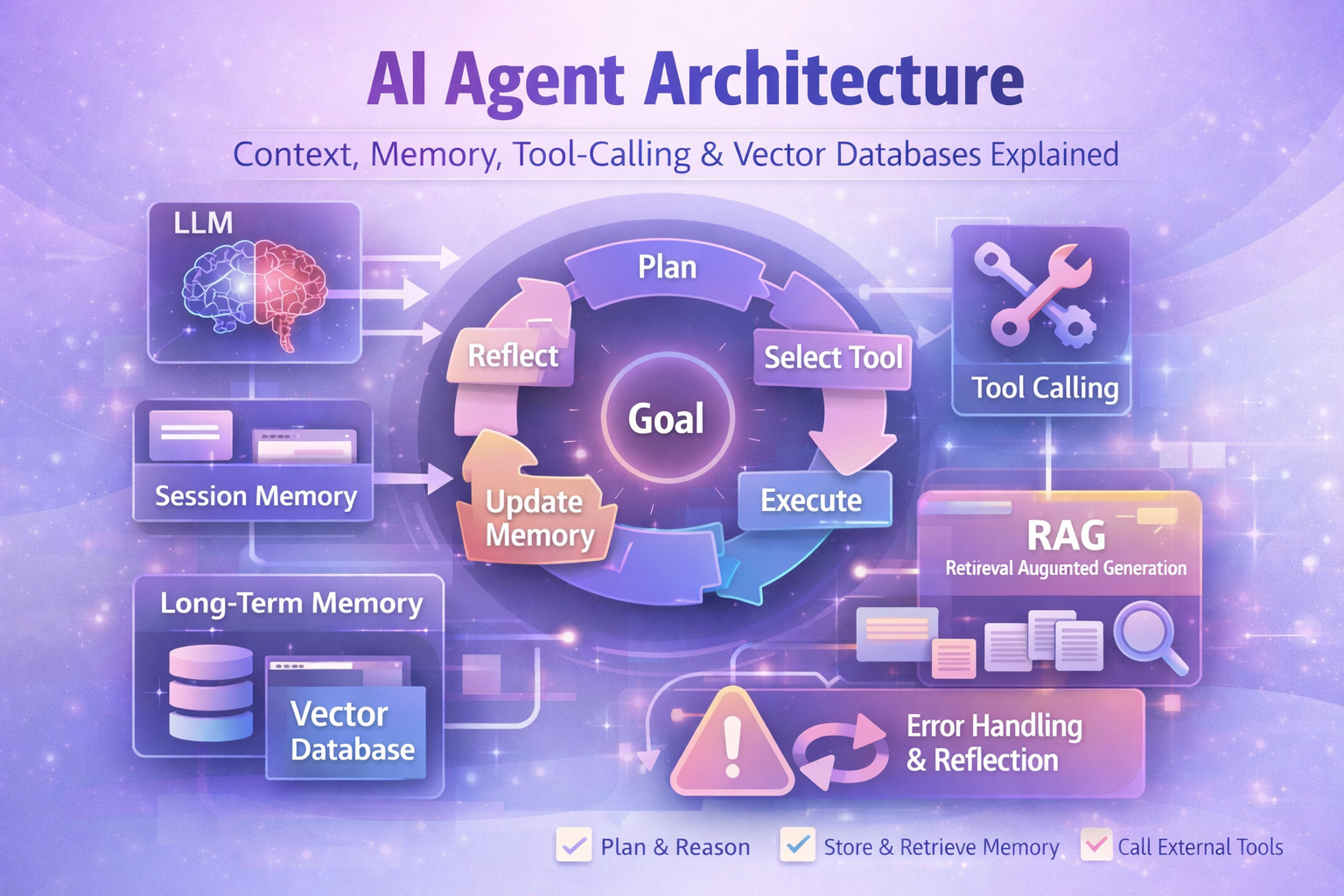
Building a real AI agent requires solving four fundamental challenges: context management (what does the agent know right now?), memory (what should it remember across sessions?), tool-calling (what can it do and how does it choose?), and reliability (what happens when tools fail or the LLM makes mistakes?).
2. The Agent Lifecycle
A well-designed AI agent follows a structured lifecycle that repeats until the goal is achieved or a termination condition is met:
Planning and Reasoning
The LLM receives the goal, its current context (including memory retrieval results), and the available tools. It generates a plan — breaking the goal into sub-tasks and selecting which tool to call first. This is where model quality matters most: GPT-4o, Claude 3.7, and Gemini 1.5 Pro significantly outperform smaller models for complex multi-step planning. Learn more about implementing this with Claude in our guide to building with the Claude API.
# Conceptual Agent System Prompt Structure

system_prompt = """
You are a task execution agent. You have access to the following tools:
{tool_definitions}

Current task: {user_goal}
Relevant memory: {retrieved_memory_chunks}
Previous steps taken: {execution_history}

Think step-by-step. Select the most appropriate tool for the next action.
If the task is complete, respond with TASK_COMPLETE and a summary.
If you encounter an error, reflect on it and try an alternative approach.
"""
Execution and Reflection
After tool execution, the agent receives the result and enters a reflection step — evaluating whether the result moves it toward the goal, whether it encountered an error requiring a different approach, or whether the goal is now complete. This ReAct (Reasoning + Acting) pattern is the foundation of most production agent systems.
3. Memory Systems
Memory is what separates a stateless LLM from a true agent. There are three distinct memory layers, and most production agents need all three:
Session Memory (In-Context)
The current conversation thread appended to the LLM's context window. This is the agent's "working memory" — everything that has happened in the current session. Limitations:
- Bounded by the model's context window (GPT-4o: 128k tokens, Claude 3.7: 200k tokens)
- Lost when the session ends — no persistence between conversations
- Costs money per token — full conversation history in every API call becomes expensive for long sessions
Long-Term Memory (Vector Database)
Persistent storage of important information encoded as vector embeddings. When the agent starts a new session or needs to recall past interactions, it performs a semantic similarity search against the vector database to retrieve relevant memories and inject them into the current context. This gives the agent the illusion of remembering without hitting context window limits.
# Long-term memory store/retrieve pattern (pseudocode)

class AgentMemory:
    def __init__(self, vector_db, embedder):
        self.db = vector_db       # Pinecone / Qdrant / Weaviate
        self.embed = embedder     # text-embedding-3-small or similar

    def store(self, content: str, metadata: dict):
        """Store a memory after each significant agent action"""
        embedding = self.embed(content)
        self.db.upsert(
            vectors=[{"id": uuid(), "values": embedding,
                      "metadata": {**metadata, "text": content}}]
        )

    def retrieve(self, query: str, top_k: int = 5) -> list[str]:
        """Retrieve relevant memories before each agent cycle"""
        query_embedding = self.embed(query)
        results = self.db.query(
            vector=query_embedding,
            top_k=top_k,
            include_metadata=True
        )
        return [r.metadata["text"] for r in results.matches]
Episodic vs Semantic Memory
A useful mental model borrowed from cognitive science:
- Episodic memory: "What happened" — specific past events, user interactions, previous task outcomes. Stored with timestamps and session IDs. Used for recalling "last time we spoke, you said..."
- Semantic memory: "What is known" — facts, domain knowledge, user preferences, learned rules. Used for "I know this user prefers concise responses" or "the database schema for this project is..."
4. Tool-Calling Architecture
Tool calling (also called "function calling") is the mechanism by which an LLM executes actions in the external world. The LLM doesn't directly call APIs — it outputs a structured JSON specification of which function to call and with what arguments, and your application code handles the actual execution.
Tool Definition Pattern
# OpenAI / Claude tool definition structure

tools = [
    {
        "type": "function",
        "function": {
            "name": "search_knowledge_base",
            "description": "Search the internal knowledge base for information relevant to the user's question. Use this when you need factual information about the company, products, or policies.",
            "parameters": {
                "type": "object",
                "properties": {
                    "query": {
                        "type": "string",
                        "description": "The search query to find relevant information"
                    },
                    "top_k": {
                        "type": "integer",
                        "description": "Number of results to return (1-10)",
                        "default": 3
                    }
                },
                "required": ["query"]
            }
        }
    },
    {
        "type": "function",
        "function": {
            "name": "send_email",
            "description": "Send an email to a specified recipient. Only use when the user explicitly requests sending an email.",
            "parameters": {
                "type": "object",
                "properties": {
                    "to": { "type": "string", "description": "Recipient email address" },
                    "subject": { "type": "string" },
                    "body": { "type": "string" }
                },
                "required": ["to", "subject", "body"]
            }
        }
    }
]
Tool Selection by the LLM
The quality of your tool descriptions is the single biggest factor in how well the LLM selects tools. Vague descriptions lead to wrong tool selection. Be explicit about:
- When to use this tool (and when NOT to)
- What the tool returns and what format
- Any side effects (this tool sends an email / charges a credit card)
- Prerequisites (call get_user_id before calling update_user)
Error Recovery
Production agents must handle tool failures gracefully. The LLM should be instructed to retry with modified parameters, try an alternative tool, or escalate to a human when it encounters repeated failures on the same step:
# Error recovery in the agent loop (pseudocode)

MAX_RETRIES = 3
MAX_ITERATIONS = 20

for iteration in range(MAX_ITERATIONS):
    response = llm.call(system_prompt, messages, tools)

    if response.finish_reason == "tool_calls":
        for tool_call in response.tool_calls:
            try:
                result = execute_tool(tool_call.name, tool_call.arguments)
                messages.append(tool_result_message(tool_call.id, result))
            except ToolError as e:
                # Inject error as tool result — let LLM reflect on it
                messages.append(tool_result_message(
                    tool_call.id,
                    f"ERROR: {str(e)}. Please try a different approach."
                ))

    elif response.finish_reason == "stop":
        return response.content  # Task complete

return "MAX_ITERATIONS reached — task incomplete"5. RAG Pipelines
Retrieval-Augmented Generation (RAG) is the technique of retrieving relevant information from an external knowledge base and injecting it into the LLM's context before generating a response. It's the primary way to give an LLM access to information beyond its training data.
Chunking Strategy
How you split your documents before embedding is critical to RAG quality. Poorly chunked documents produce low-quality retrievals regardless of your embedding model or vector database:
- Chunk size: 512–1024 tokens is the sweet spot for most use cases. Too small loses context; too large dilutes the embedding signal.
- Overlap: 10–20% overlap between chunks prevents information loss at boundaries.
- Semantic chunking: Better than fixed-size chunking — splits at logical boundaries (paragraph breaks, section headings) rather than arbitrary token counts.
- Metadata: Store source URL, page number, document title, and section heading alongside each chunk for citation and filtering.
Embedding Models
The embedding model converts your text chunks into high-dimensional vectors. Current top choices:
text-embedding-3-large(OpenAI) — 3072 dimensions, best quality, higher costtext-embedding-3-small(OpenAI) — 1536 dimensions, good quality/cost balancevoyage-3(Voyage AI) — strong performance on domain-specific contentnomic-embed-text— open-source option for self-hosted deployments
Retrieval Augmentation
Standard top-k similarity search is a baseline. For production RAG, combine multiple retrieval strategies:
- Hybrid search: Combine dense vector search (semantic) with sparse BM25 (keyword) using a reranker to merge results
- HyDE (Hypothetical Document Embeddings): Ask the LLM to generate a hypothetical ideal answer, embed that, and search for documents similar to the ideal answer
- Reranking: Use a cross-encoder reranker (Cohere Rerank, BGE-reranker) on your top-20 results to select the best 5 before injecting into context
6. Vector Database Choice
Choosing the right vector database depends on your scale, budget, deployment requirements, and whether you need additional features like hybrid search or RBAC:
Pinecone
Best for: Production SaaSFully managed, serverless option available. Excellent performance at scale. Simple API. Built-in metadata filtering. No infrastructure management. Generous free tier for small projects. Best choice for most production applications where you don't want to manage infrastructure.
Weaviate
Best for: Hybrid searchOpen-source with a managed cloud option. Natively supports hybrid search (vector + BM25 keyword) in a single query. GraphQL query interface. Excellent for document retrieval use cases where keyword matching matters alongside semantic similarity.
Qdrant
Best for: Self-hosted / cost-sensitiveOpen-source, written in Rust for high performance. Excellent self-hosted option when you can't use a managed service. Supports payload filtering, sparse vectors (for hybrid search), and named vectors. Growing managed cloud offering.
Supabase Vector (pgvector)
Best for: Existing Postgres userspgvector extension on PostgreSQL. Best choice when you already use Supabase or PostgreSQL — keeps all your data in one database. Not recommended for very large-scale vector search (millions of vectors) where dedicated vector DBs significantly outperform. Perfect for smaller RAG applications.
Summary: Production AI Agent Architecture Stack
- LLM: GPT-4o or Claude 3.7 Sonnet for agent reasoning — quality matters more than cost for the orchestrating model
- Orchestration: LangChain, LlamaIndex, or custom loop — custom loops give more control and are easier to debug in production
- Session memory: In-context conversation history with token budget management (sliding window or summarization)
- Long-term memory: Vector database with embedding model — Pinecone Serverless for most production cases
- Tools: Typed function definitions with explicit descriptions, error handling, and side-effect warnings
- RAG: Semantic chunking + hybrid retrieval + cross-encoder reranking for best quality
- Observability: LangSmith, Langfuse, or Helicone — trace every LLM call, tool call, and retrieval for debugging and cost optimization

Anju Batta
Senior Full Stack Developer, Technical SEO Engineer & AI Automation Architect with 15+ years of experience. Building production AI agent systems with OpenAI, Claude, LangChain, and Pinecone from Chandigarh, India.
Build an AI Agent Together →